
Workplace Safety Apps: A Practical Guide for EHS Teams
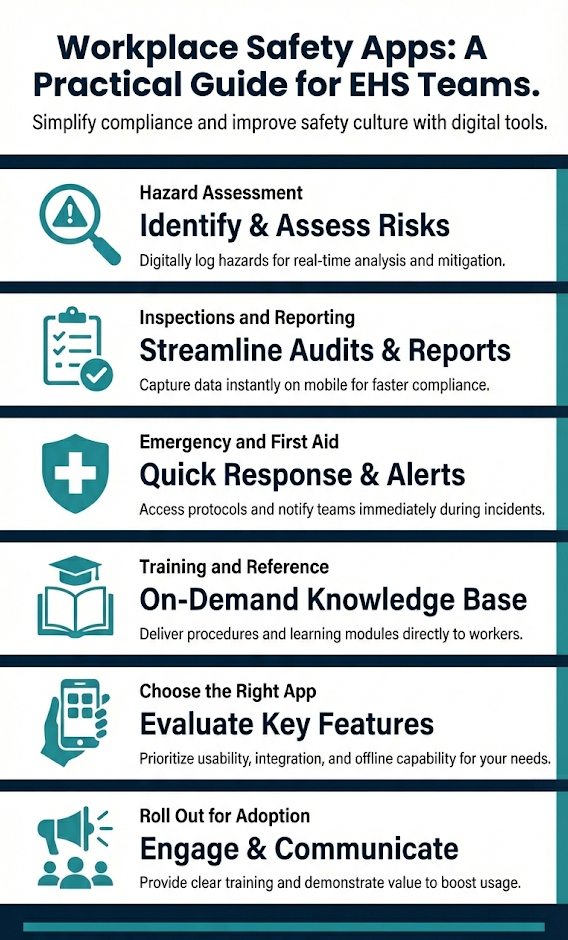
Safety professionals perform most of their critical work in the field, away from a desk. Whether it's walking a job site, responding to an incident, or conducting a field inspection, the work happens where the hazards are. Workplace safety apps put critical tools and references directly on the devices your team already carries. The right apps can speed up hazard reporting, simplify inspection workflows, and give field workers instant access to chemical data, noise readings, and emergency procedures. The challenge is knowing which ones are worth your time.
This guide breaks down the most practical workplace safety apps by function, so you can find the tools that match your program's actual needs.
Hazard Identification and Field Assessment Apps
Several free apps from federal agencies stand out for field hazard assessment because they are built on regulatory data and carry no subscription fees.
The OSHA-NIOSH Heat Safety Tool calculates the heat index for your current location using GPS and displays a color-coded risk level. The app provides water break reminders, rest schedules, and heat illness warning signs based on the calculated risk level. This ties directly to OSHA's heat illness prevention guidance, which recommends monitoring the heat index as part of any outdoor work plan. The app is free on both iOS and Android.
The NIOSH Ladder Safety App addresses one of the most common serious injury sources in general industry and construction. It uses your phone's accelerometer to indicate whether a ladder is positioned at the correct angle, and includes reference material on ladder selection. Falls remain a leading cause of workplace fatalities, making this a practical daily-use tool. Free on both platforms.
For noise exposure, sound level meter apps can give you a rough indication of decibel levels in the field. While phone-based readings should not replace calibrated instruments for compliance monitoring, they can help supervisors identify areas that need formal assessment. NIOSH has published research on the accuracy of smartphone sound measurement apps, with several scoring within acceptable margins for screening purposes.
The NIOSH Pocket Guide to Chemical Hazards provides industrial hygiene data for hundreds of chemicals, including exposure limits, physical descriptions, and personal protective equipment recommendations. This reference is particularly useful for workers who encounter unfamiliar substances and need immediate guidance. Free on both iOS and Android.
Inspection and Compliance Apps
Mobile inspection tools replace paper checklists with digital workflows that sync to a central system in real time.
EHSSoftware.io offers a user friendly native mobile app for iOS and Android that handles audits, inspections, safety observations, incident reporting and more to extend the EHS program to the field. Users conduct inspections using company specific forms, attach photos directly from their device camera, assign corrective actions, and track findings across single or multi-site operations. The app works offline and syncs automatically when connectivity returns, so field workers on remote job sites can complete inspections without interruption.
Inspection apps like these help employers meet documentation requirements under OSHA's general recordkeeping standards by creating photo-verified records of workplace conditions. When an OSHA compliance officer asks for evidence of routine hazard assessments, a digital trail is significantly easier to produce than a filing cabinet of paper forms. For a deeper look at what these tools offer, see this overview of safety inspection software and its benefits.
For organizations that need hazard reporting safety observation and near-miss reporting apps allow field workers to submit from their phone with documentation and supporting photos. This lowers the barrier to reporting and gets hazard information to the safety team faster.
Emergency Response and First Aid Apps
Two free apps stand out for emergency preparedness on job sites.
The American Red Cross First Aid App provides step-by-step instructions for treating common injuries and medical emergencies, with content available in English and Spanish. It integrates with 911 calling and includes short video demonstrations. For sites where workers may be the first to respond to a medical event, having a guided reference on every phone adds a layer of readiness that printed posters cannot match.
The FEMA App delivers real-time alerts from the National Weather Service, helps users locate nearby emergency shelters, and provides preparedness checklists for various disaster types. For employers with outdoor operations or facilities in areas prone to severe weather, this app supports the planning elements of an emergency action plan under 29 CFR 1910.38.
Both apps are free, work offline for core features, and require no account setup.
Training and Reference Apps
Not every safety app focuses on compliance or hazard identification. Some address the physical well-being and awareness side of a safety program.
Ergonomics apps offer guided stretching routines, workstation setup tips, and break reminders. For employees who spend long hours at a desk or in repetitive physical tasks, these tools provide a low-cost way to reinforce injury prevention habits between formal ergonomic assessments.
Fatigue management tools help supervisors evaluate whether workers on extended shifts or irregular schedules are fit for duty. Some use scoring algorithms based on shift patterns, sleep data, and task demands to flag elevated risk. These are especially relevant for operations that run around the clock or involve safety-sensitive work like equipment operation or driving.
Incident cost calculators give safety professionals a way to estimate the financial impact of workplace injuries using industry-specific variables. These tools are useful when building the business case for a safety investment, because they translate injury data into dollar figures that resonate with operations and finance teams.
How to Choose the Right Safety App for Your Team
Not all EHS mobile apps are built the same, and picking one based on a feature list alone often leads to tools that sit unused on company phones. Before committing to a rollout, evaluate each app against these criteria:
- Platform compatibility. Your team may carry a mix of iPhones and Android devices, so any app you standardize on needs to work across both operating systems.
- Offline functionality. Safety apps require offline functionality to operate on job sites with limited cell service. If inspections or reports can only sync when connected to Wi-Fi, workers in remote locations lose the benefit entirely.
- Data privacy and security. Incident reports, inspection photos, and employee observations can contain sensitive information. Look for apps that offer encrypted storage, role-based access controls, and clear data retention policies. If the app stores information on third-party servers, verify where that data lives and who can access it.
- Ease of use. Field workers will not use a tool that requires extensive training or takes longer than the paper process it replaced. Test any app with a small group of frontline workers before committing to a company-wide rollout. Their feedback will tell you more than a product demo ever will.
Getting Your Team to Actually Use Safety Apps
The most common failure mode for safety apps is not the technology itself but adoption. A well-chosen app that nobody opens is worse than no app at all. Three steps make the difference:
- Start small. Pick one or two apps that solve a specific, visible problem your team already complains about. If field inspections take too long on paper, start there. If workers have no easy way to report near-misses, that is your entry point. Solving a real pain point builds credibility for future rollouts.
- Involve field workers early. Ask the people who will actually use the app what features matter to them and what would get in their way. This input shapes better decisions and creates buy-in that top-down mandates cannot replicate. When workers feel like they had a voice in the process, resistance drops.
- Track usage and follow up. After launch, monitor whether reports are actually being submitted and whether the data is improving your safety metrics. Share results with the team so they can see the impact of their participation. If adoption stalls, ask why before assuming the tool is the problem. Sometimes the issue is a workflow mismatch, not the app.
Moving Forward with Workplace Safety Apps
Workplace safety apps extend a strong safety program by putting hazard tools, inspection workflows, and emergency references on every worker's phone. The best results come from matching the right app to a specific need, testing it with real users, and building it into daily workflows rather than treating it as an add-on. Start with the category that addresses your biggest gap, get your team involved, and build from there.


 OSHA's Top 10 Most ...
Latest Posts
- Corrective Action Management: From Open Item to Verified Fix
- OSHA Recordkeeping for Multiple Locations | Multi-Site Guide
- Reducing Human Error in the Workplace: Strategies, Tools, and Safety Leadership
- OSHA Form 301: Requirements, Completion Guide, and Best Practices
- 5 Best Practices for Creating a Storyboard & Shot Sheet to Develop an eLearning Course
Topics
See all
- Safety Training
- Safety Resources
- News and Regulatory Alerts
- EHS Software
- Case Studies
- Violations and Penalties
- What is OSHA
- Health and Safety
- COVID-19 Corona Virus
- Conferences
- Near Misses
- OSHA Top 10 Cited Standards
- Workforce Safety
- Driver Safety
- Slips, Trips and Falls
- Whistle Blower Protection
- Experience Modification Rate
- Featured
- Hazard Communication
- Joint Employment
- Recordkeeping and Reporting
- Workers Comp
- Arc Flash
- Chemical Safety
- E-Learning
- Electrical Safety
- Foreign Languages
- How to Increase the EHS Budget
- Human Error
- Lockout / Tagout
- Mobile Apps
- OSHA 301
- OSHA Inspections
- OSHA Severe Injury Reporting Program
- OSHA Violations
- Parking Lot
- Repeat Offender Penalties
- SOC 2 Compliance
- Safety Meetings
- Salary Surverys
- Stop Work Authority
- Winter Safety
- Workers' Compensation
- audit and Inspections
- E-Learning
- Educational Strategies
- Featured
- Self Directed Learning
- Blended Learning
- Social Learning
- eLearning Storyboard
